

- Joined
- May 17, 2026
- Messages
- 28
- Reaction score
- 22
Signature display has been changed to make it easier to see what you are doing.
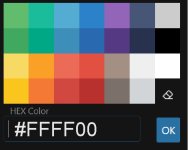
When you’ve selected some text and click the color pallet icon, the window that pops up allows you to enter colors that aren’t offered by entering a hex color code and clicking OK.
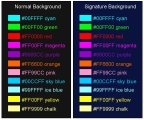
Here are some alternate colors that aren't in the picker you can use with their hex codes. There are hex color charts online with hundreds of colors
- The background color has been changed to a dark blue
- The text defaults to white
- You may use up to 3 lines (if you don't use big text)
- You may use up to 2 smileys
- We don’t recommend using an image at this time
COLORS
The text colors offered in color chooser box lack some basic choices so here are some alternates and how to use them.When you’ve selected some text and click the color pallet icon, the window that pops up allows you to enter colors that aren’t offered by entering a hex color code and clicking OK.
- Hex codes require the # symbol
- There are no spaces in the code
- The 0 character is a zero,, not a capital O
Here are some alternate colors that aren't in the picker you can use with their hex codes. There are hex color charts online with hundreds of colors